Archive
Code 128 Barcode Issues with Oracle BI Publisher
We were recently having problems with Code 128 barcodes in Oracle BI Publisher (AKA: XML Publisher; AKA: Analytics Publisher) within Oracle EBS (E-Business Suite). After a patch, the barcodes would show these accented I (Ì Î) characters at the beginning and end of the Code128 barcode.
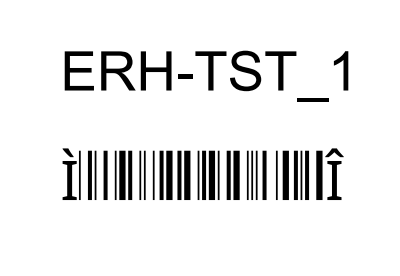
Our instance used the Oracle Out-of-Box, or seeded, Code128 barcode font: 128R00.ttf
When investigating the issue, we ran into another bug where Microsoft Word would show these windings type symbols when displaying the properties of the barcode element:
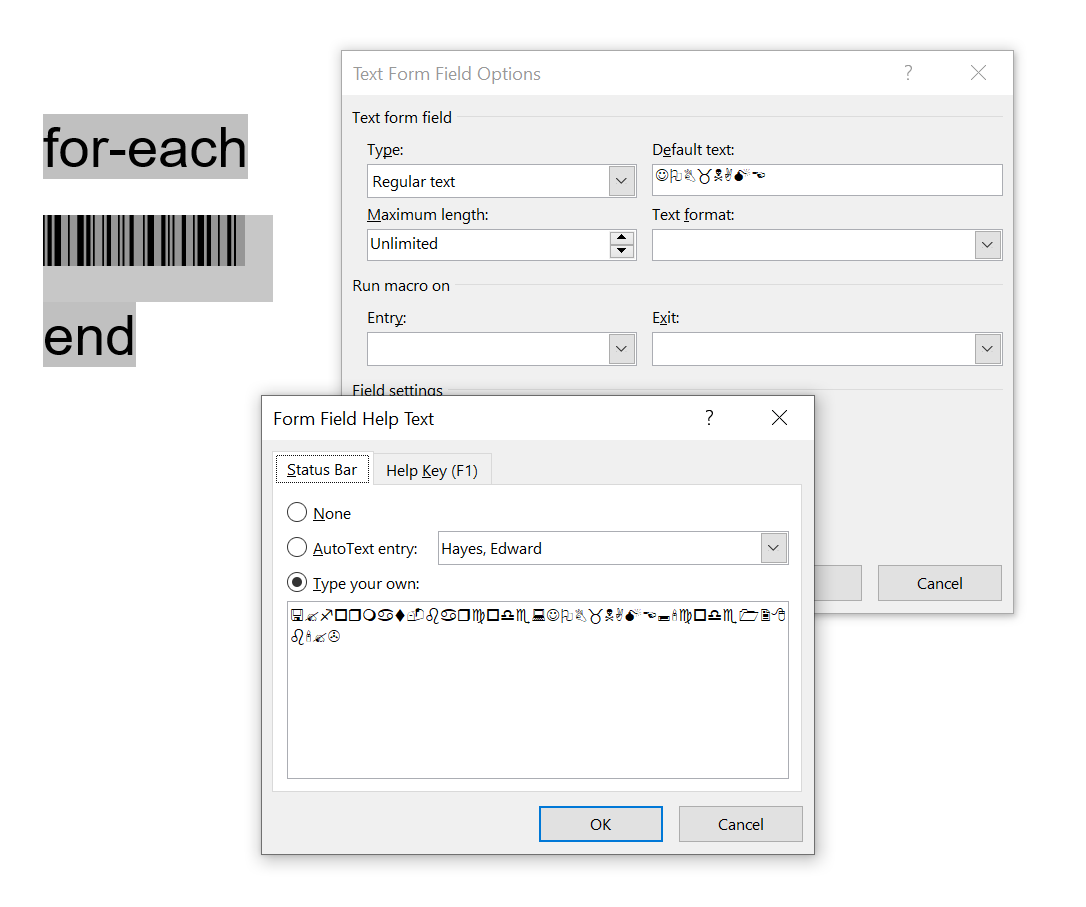
Oracle’s support had a document that describes a solution.
Barcode Font File 128R00.ttf Properties in Template Show Junk Characters (Doc ID 2317123.1)
The document says to fix the windings symbols, recreate the barcode element in another font, and then apply the Code128 font again.
But that’s only temporary. Saving and re-opening the template causes the problem to resurface. Not acceptable.
I found that the IDAutomation Code128 font does not have these issues. Adding the font to EBS, adding into my Windows system, and creating a template with this alternate font, solved the problem.
Another Alternative font is Libre Barcode 128 which is functional in EBS and Word. Licensing for this font is free for commercial use. It also seems that this is supported by Oracle.
CLRC663 Module SPI -> I2C

I got this CLRC663 RFID module from Aliexpress. I wanted to try and get it to work with I2C. The datasheet of the controller chip says it’s quite doable.

If you need to change your CLRC663 module to work with I2C, you can easily do so by using a hot air gun/rework station and changing resistors R2 -> R1, and R4 -> R8.

You will also want to set the I2C address by moving R29 -> R9 and R28 -> R8 (I’m not sure why there are two R8s on this board. *shrugs*). This will set the the controller pins 28 and 30 to GND.

After these changes are made, you should be able to communicate with the chip at I2C address 0x28.
SOLVED: Numeric or value error in Oracle APEX Interactive Grid
I have been working with Oracle APEX framework for work. I keep getting this error when saving data in an interactive grid:
APEX INTERACTIVE GRID ORA-06502: PL/SQL: numeric or value error: character to number conversion error
The application has been working for months, and then it breaks. I have no idea why. The error is happening when updating a Varchar field, so it’s certainly not table data type problem, even though, the error would lead you to believe that.
After hours, even days, of troubleshooting and only able to fix the problem by rebuilding the interactive grid, I found the root cause.
Under in the APEX development interface, for the page that is having the problem, in the Processing section, there is a process with type Interactive Grid – Automatic Row Processing (DML) which processes row updates when data is changed and saved by the user. Under the settings there’s an options Prevent Lost Updates which is intended to prevent two users from saving the same record differently. I turned this off, and it’s working now.
There is obviously a bug in Oracle’s code:
- I created a new record, then updated that same record, and received the error. There’s no way that record was opened by anybody else.
- If this is the “feature” doing it’s job, and making sure the same record can’t be edited twice by different users, the error message is extremely poor, frankly, its so unrelated, it can’t possibly be the intended error when an conflicting update is detected.
I was thinking of logging an Service Request with Oracle, but two problems here, this isn’t really a supported application, as it’s “free” with the database. And also, the Oracle support page isn’t working; lovely. It’s been broken for at least two days.
Solution: BI Publisher QR Codes
I saw a post on StackOverflow asking How to use variable in chart.apis.google link for QR Code and I was quite intrigued. I didn’t think it could be done at first. But then I figured it out.
I do know that BI Publisher has built in Chart support, so my first thought was to just use that. But BI Publisher charting cant generate QR Codes. None the less, I linked to BI Publisher Report Designers guide to explain those details if anyone stumbled upon this post looking for actual charts.
My second thought was to follow a blog entry that an Oracle developer posted about using QR Codes in BI Publisher. It mentioned making a java class, and using an IDAutomation QR Font. It was quite complex. This is probably the method to go after if you want all the data to remain internal to the Oracle server in the enterprises data-center. I posted the details to that too.
Finally, I remember using dynamic images at Emerson for insertion of Casting images into Work-orders/Shop-packets. I figured why not give it a shot. I created a quick XML test file, and a simple RTF file. I use the concat (concatenate) function in BI Publisher to combined the Google Charts API for QR codes and the variable I wanted encoded.
Test XML
<test_header>
<test_row>
<row_num>1</row_num>
<value>TESTA</value>
</test_row>
<test_row>
<row_num>2</row_num>
<value>TESTB</value>
</test_row>
</test_header>
Test RTF Template

RTF Template
Image ALT TEXT
url:{concat(‘https://chart.apis.google.com/chart?cht=qr&chs=500×500&choe=UTF-8&chld=H&chl=’,value)}
[when copy/pasting from this page, replace the x in the URL with one hand-typed.]
My first attempt failed because of a space in my test data. If you have spaces or special characters in the data you want encoded in the QR code, make sure you URL encode the data that you want to pass into the Google API URL. Oracle allows you to do this with the UTL_URL function. Also note: this post is being made with WordPress, the single quotes are improperly being replaced with smart quotes and/or HTML entities… use care if copying and pasting, and make sure to use the single quote as per screen shot.
Example use of UTL_URL.ESCAPE
select rownum row_num, utl_url.escape(record_value) value from test_table
Once I removed the space from my test data, it worked! I was shocked how easy it could be.
Test Output
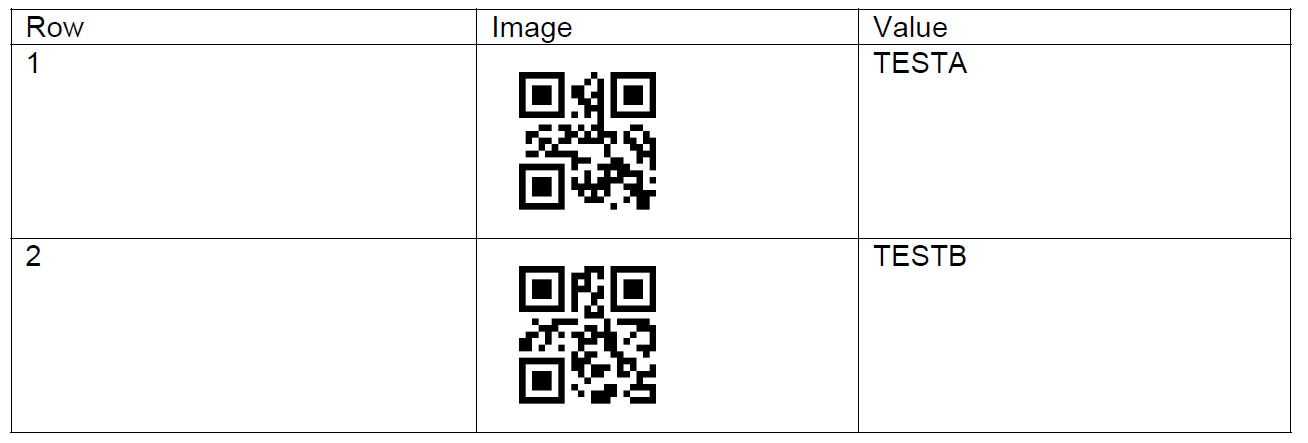
PDF Output
Other Considerations
One last thing to note, if you expect this to work on your enterprise server/network/data-center, you’ll probably have to open up the firewall.
Updating Realtek Drivers for PFSense on a ZOTAC ZBox
A long while back I built a ZOTAC Zbox (ZBOX-CI323NANO-U) to run PFSense and act as my router. For the most part, it has worked pretty well. The features are great, without any of the gimmicky stuff you’d find on a consumer router. It’s also a lot more upgradable than a consumer router.
One problem though, on occasion I’d have to restart the ZBOX when the internet would stop working. The display I had connected to the PFSense machine said this during a failure:
re1: watchdog timeout
Each time the error occurred, I would hunt around the internet for a few minutes to find a solution, but I was never able to find one. I gave up for a while. But recently I took a deeper dive.
I found some pages blaming the default network adapter drivers and how they don’t work well with realtek adapters. I also found this page announcing new realtek drivers. I’ve dabbled with Linux a bit, but I’d still consider myself pretty novice. It was pretty difficult for me to get the drivers copied over to the machine, and then installed.
Here’s the process I followed to get them installed:
 ED HAYES