Archive
BI Publisher Subtemplates
We are using BI Publisher Subtemplates to change our printed PO terms and conditions based on a supplier. Subtemplates allow us to split the terms content from the formatting template.
I had the toughest time getting this to work; the documentation for subtemplates proved to be a bit rough. I found a few errors in both the formal BI Publisher documentation and Oracle provided white paper. Here are the basics for getting BI Publisher subtemplates to work.
Subtemplate
Create a new BI Publisher template the same way the main template is configured, but use a different template name/code, and make sure subtemplate is set to “Yes”.
Contents of subtemplate RTF:
<?template:standard_terms?>
Standard Terms Body
<?end template?>
<?template:100001_terms?>
Special Supplier Terms Body
<?end template?>
Report Calling the Subtemplate
You must first import the subtemplate file from the main template, then call the section of the file you want to display.
Import the Subtemplate file
When Using Server to Render Output
Syntax:
<?import:xdo://[APPLICATION_CODE].[TEMPLATE_CODE].[LANGUAGE_CODE].[TERRITORY]/?>
<?import:xdo://XXPO.XXPO_TERMS_R100.en.US/?>
When Using Desktop Viewer to Render Output
<?import:file:C:/XXPO_TERMS_EGS_R100.rtf?>
Call the subtemplate with a condition
<?choose:?>
<?when:SUPPLIER_NUMBER=’100001′?>
<?call:100001_terms?>
<?end when?>
<?otherwise:?>
<?call:standard_terms?>
<?end otherwise?>
<?end choose?>
Things to Note
- Language code is always lower case
- Territory is always upper case
- Don’t forget the forward slash at the end of the server based import string
- Some formatting in your subtemplate will cause the subtemplate import to fail
- I couldn’t get the subtemplate to be two columns using built in RTF/Word functionality
- I did get the main document to put the subtemplate text into two columns
- Intended bullets and numbering work fine
Oracle Documentation
- Sub Templates in Oracle BI Publisher (White Paper)
- Oracle® XML Publisher Report Designer’s Guide Release 12
Print Labels Directly From Oracle to Zebra Printers
Labeling is a very important business process that usually confuses even the best of us. It involves many moving parts; including, but not limited to, ERP systems, printer hardware, bar-code symbologies, and label templates. It’s seemingly rare in corporate IT to find a single person who knows enough about all of these technologies to create a simple labeling solution. Third party companies like Bartender and Loftware have swooped in to provide “turnkey solutions” which have their own complexities. From my point of view, these third party solutions provide little, if any, value. I’d even go as far to say that they detract value from the overall solution.
Here are a few points which a third party software vendor may bring up which will seem enticing to you:
- With a third party solution, you can have one centralized label template repository
- We offer a visual label template editor
- We can direct printing based on business data
Here is what the sales people won’t tell you about third party labeling solutions:
- License costs are extraordinary high and repeat annually
- Each server requires a license
- Each server in a load balancing cluster will require a license (A license per IP address)
- Each test/development server requires a license
- The software requires hardware/virtual machines (VMs) to run on (which also has an additional cost)
- Multiply it for each test/development instance
- The software provides an additional point of failure which can be difficult to troubleshoot
- Additional desktop software is also required, and may not be very robust
- Precise formatting can be very difficult, or impossible
- Even basic ZPL functions are difficult or impossible to implement
- Some key features, like linking to data from external sources, is limited in capability
- There’s a conflict of interest between the software quality and desire to sell consulting services
- Zebra offers a WYSIWYG visual label template editor, for a lower price
Let me be the first to tell you; third party software is not going to make your labeling solution simple. In practice, it will likely make you want to pull your hair out.
Luckily, Oracle comes ready to print labels out of the box! Don’t let the Loftware salesperson tell you otherwise! Here are the steps you can take to print a label directly from Oracle; no third party systems involved.
Design a ZPL Template:
^XA
^MNW^POI^PMN^LH0,0^JMA^MD25^PQ1,0,0,N^CI0^PW812^MMT^LL406^LRY^FO20,25^GB773,0,70^FS
^FT340,80^A0N,60,60^FH^FN10^FDITEM^FS
^MCY^XZ
Save the template on your Zebra printer’s flash memory
![ZebraTemplateZPL[1]](https://blog.edhayes.us/wp-content/uploads/2016/06/zebratemplatezpl1.png?w=595&h=586)
Configure your device IP address.
![DeviceIP[1]](https://blog.edhayes.us/wp-content/uploads/2016/06/deviceip1.png?w=595&h=101)
Set your profile option: ‘WMS: Label Print Mode’ = ‘Synchronous – TCP/IP’
![Profile[1]](https://blog.edhayes.us/wp-content/uploads/2016/06/profile1.png?w=595&h=203)
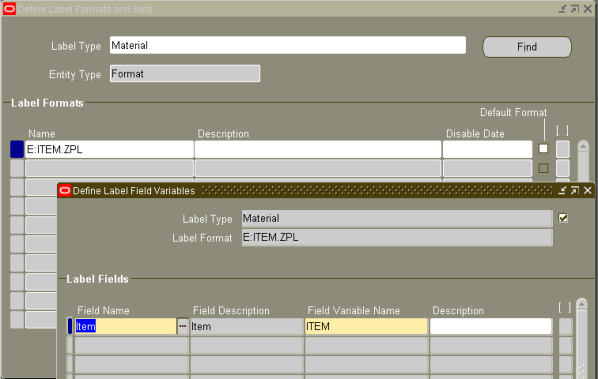
Set up your label Format and fields
(make sure the name matches the storage path on the printer)
Back to the third party software benefits; are any of them true? I don’t think so.
For one, Zebra offers software (ZebraNet Bridge Enterprise) that will push label templates to all your zebra printers in just a few clicks; making centralized label templates a moot point. The Zebra software is only a few hundred dollars. Once.
As mentioned before, Zebra offers label template design software (Zebra Designer) that is, in my experience, far better than a third parties software. Think of it this way, the easier Zebra makes printing labels, the more hardware/supplies your company will buy from them. On the flip side, with third party vendors like Loftware, the more complex the software, the more consulting services they can sell you.
Lastly, the ERP system, in my case, Oracle, should be robust enough to direct labels to desired printers. If it’s not, you will likely be better off designing a custom solution in the ERP system rather than implementing a third party package, which itself will require much technical work.
With just a little work, you can be printing labels, directly from Oracle, without any need for virtual machines or complex middleware.
References
ERPschools – Oracle MSCA Label Printing
Zebra – Barcode Printing from Oracle WMS
BI Bublisher: Selecting first record only
I was looking for a way to only select data from the first record of a group to use in my Master Bill of Lading. I only needed the address of one of the deliveries on the trip, so I wanted to select the address from the first delivery. The other deliveries on the trip would be have the same addresses, at least how we are configuring the system.
I found this on a blog post at Oracle.com which seemed to be the answer:
<?for-each:EMPLOYEES[position()='1' or position()=last()]?>
I tried it, and different combinations, for quite some time. I tried single quotes, double quotes, I tried it in an IF statement. It turns out the single quotes were causing problems. This is the way it finally worked:
<?for-each:LIST_TRIP_STOP/TRIP_STOP/LIST_DELIVERY/DELIVERY[position()=1]?>
I wonder if Oracle tested this before they published the blog entry. At least they pointed me in the right direction.
Oracle WMS RUP 12
Logistics Consolidated RUP12 (VERSION 12.1.1 TO 12.1.3 [RELEASE 12.1])
Patch: 21220763
Fixed Bugs:
Oracle Support Quality
I have had an Oracle Service Request (SR) open for 3 years now. The request has to do with how slow several security based objects are to be displayed when a user is set up using Oracle’s newer RBAC (Role Base Access Control) security structure. Right now we are working on is the list of concurrent requests.
The SR was originally opened as a severity 2. About a year into the SR, one of my DBAs had some work to do on it and was getting poor response from Oracle support, so he raised the severity to 1. It has been at severity 1 for about 2 years now.
I have gotten several patches from Oracle. The first one we applied showed no change in performance at all. When they released the second patch, I insisted they provide details of what the improvement was so I could confirm A) it actually did improve, and B) they have actually replicated the problem internally. I didn’t want to waste our DBA team’s time applying an alpha stage patch that has been untested.
I never got the proof that the patch was tested. I gave up and had the patch applied. The patch broke the security all together; a user would have no access to concurrent requests at all. Yes it was fast, but it didn’t work.
A third patch was released; it fixed the security, so at least the user would get access, but the performance was 50% slower than an un-patched system.
For several months I have been asking for updates on the SR every week or so, and it get the standard “we are working on it” or “requested status from development” response.
I have poked the bear, per-say, this last week by asking for some manger interaction. Take a look at the latest response I got from them:

Note in the title of the SR I mentioned “W/RBAC.” The first question in this SR update is “Are you using RBAC model to define security?” ARE YOU KIDDING ME?
Oracle WMS RUP 11 Included Patches
Finding patches that are included as a part of Oracle WMS RUP 11 is not as simple as it could be, so here is a list:
Patch 20187263
Patch R12.WMS.B.delta.11: Logistics Consolidated RUP11 (VERSION 12.1.1 TO 12.1.3 [RELEASE 12.1])
The following bugs are fixed by this patch:
 ED HAYES